PHP2Shell Vulnerability: What It Is and How to Fix It
PHP2Shell is two critical unauthenticated PHP RCEs patched on 21 Oct 2026. See affected versions, how to verify your runtime, official upgrades, and why a WAF does not replace patching.

On 21 October 2026, the PHP project shipped an emergency security release for two critical flaws that can allow unauthenticated remote code execution on servers that serve HTTP with PHP. Security teams and vendors widely refer to the pair as PHP2Shell (or php2shell). The official identifiers are CVE-2026-109618 and CVE-2026-109619, each rated 9.2 on CVSS v4.0.
If your site, API, CMS, or appliance runs PHP for web requests, treat this as a patch-now event. Updating the PHP runtime is the only complete fix. Configuration workarounds and a web application firewall can reduce some exposure paths, but they do not replace the security release.
What Is PHP2Shell?
PHP2Shell is a community nickname for two related bugs in the PHP engine—not a WordPress plugin issue, not a Laravel package CVE, and not a single misconfigured .htaccess rule.
| Identifier | GitHub advisory | Plain-English summary |
|---|---|---|
| CVE-2026-109618 | GHSA-w8hw-w9fx-j79w | Out-of-memory (OOM) handling can leave request memory in an invalid state. Cleanup may then treat that state as valid and enable remote code execution. |
| CVE-2026-109619 | GHSA-6wmf-4rv5-p3rp | Request-owned internal state can survive after its memory is freed. A later request on the same worker may use that stale state, enabling use-after-free, memory disclosure, and remote code execution. |
The official PHP security advisory describes the risk without relying on the nickname. CISA and other national cyber authorities use “php2shell” in public alerts so operators can match news coverage to the CVEs.
Researchers at Calif, OpenAI, and Wiz contributed to the findings that pushed the full impact into the open. The PHP Foundation published a detailed account of the audit trail, the early leak of CVE IDs, and why the public release moved from 22 October to 21 October 2026 at 14:00 UTC.
Confirmed vs. unconfirmed
Confirmed: both CVEs, unauthenticated RCE under the conditions described by PHP, fixed versions listed below, incomplete nature of config-only mitigations, and circulation of proof-of-concept material after the leak and disclosure.
Treat carefully: claims of “mass compromise” or “every site already owned.” As of CISA’s 21 October alert, CISA had not observed exploitation at publication time. Other advisories note proof-of-concept availability and, in some cases, reported exploit attempts. That picture can change quickly—monitor your own logs and vendor advisories rather than assuming either total safety or total breach.
Why This Vulnerability Matters
These bugs sit in memory management and error handling—paths that nearly every HTTP request can touch. That is why the impact is not limited to one CMS feature flag or one obscure extension.
Practical implications:
- No application login is required for the confirmed attack patterns.
- On Apache with
mod_php, PHP’s own advisory highlights a demonstrated case where an unauthenticated request can trigger the attack before any application code runs. - Successful exploitation runs as the web worker account (the PHP-FPM pool user, Apache child, or equivalent). That is often enough to read secrets, drop a web shell, pivot to databases, or alter site content.
- WordPress, Drupal, Joomla, Laravel, and custom PHP apps are in scope when they run on a vulnerable PHP runtime that serves web traffic. The defect is in PHP itself; frameworks inherit the risk through the interpreter and SAPI, not through a specific CMS CVE.
Attack complexity is high on the CVSS v4.0 vector (and some exploit paths depend on build layout and worker behavior), but the privileges required are none and the impact on confidentiality, integrity, and availability is high. Emergency patching is still the correct operational response.
Who Is Affected?
According to the PHP project, all PHP installations that serve web requests are at risk, including:
- PHP-FPM
- Apache with
mod_php php-cgi- FrankenPHP
- LiteSpeed (LSAPI)
CLI-only scripts that never handle HTTP are a different risk profile, but most public websites and many internal apps use one of the SAPIs above.
Affected and fixed versions
PHP 8.5
- Affected
- 8.5.0 – 8.5.11
- First fixed release
- 8.5.12
PHP 8.4
- Affected
- 8.4.0 – 8.4.26
- First fixed release
- 8.4.27
PHP 8.3
- Affected
- 8.3.0 – 8.3.35
- First fixed release
- 8.3.36
PHP 8.2
- Affected
- 8.2.0 – 8.2.34
- First fixed release
- 8.2.35
PHP 8.1 and older
- Affected
- EOL — still considered vulnerable
- First fixed release
- No upstream point release
Use a vendor/LTS backport, apply the PHP security team’s minimal source backports for 7.4 / 8.0 / 8.1 if you build from source, or migrate to a supported fixed branch.
| Branch | Affected (examples) | First fixed release |
|---|---|---|
| PHP 8.5 | 8.5.0 – 8.5.11 | 8.5.12 |
| PHP 8.4 | 8.4.0 – 8.4.26 | 8.4.27 |
| PHP 8.3 | 8.3.0 – 8.3.35 | 8.3.36 |
| PHP 8.2 | 8.2.0 – 8.2.34 | 8.2.35 |
| PHP 8.1 and older | EOL — still considered vulnerable | No upstream point release Use a vendor/LTS backport, apply the PHP security team’s minimal source backports for 7.4 / 8.0 / 8.1 if you build from source, or migrate to a supported fixed branch. |
Linux distributions and cloud vendors received patches in advance of disclosure. Prefer your distribution’s updated packages when they are available (for example Ubuntu’s coordinated updates), then verify the running binary—not only the package name on disk.
How Does the Vulnerability Work?
This section stays at a defensive level. It is enough to prioritize patching and monitoring; it is not an exploit guide.
The high-level path looks like this. Both CVEs live in the PHP runtime that serves HTTP—not in your WordPress theme, Laravel controller, or application login logic:
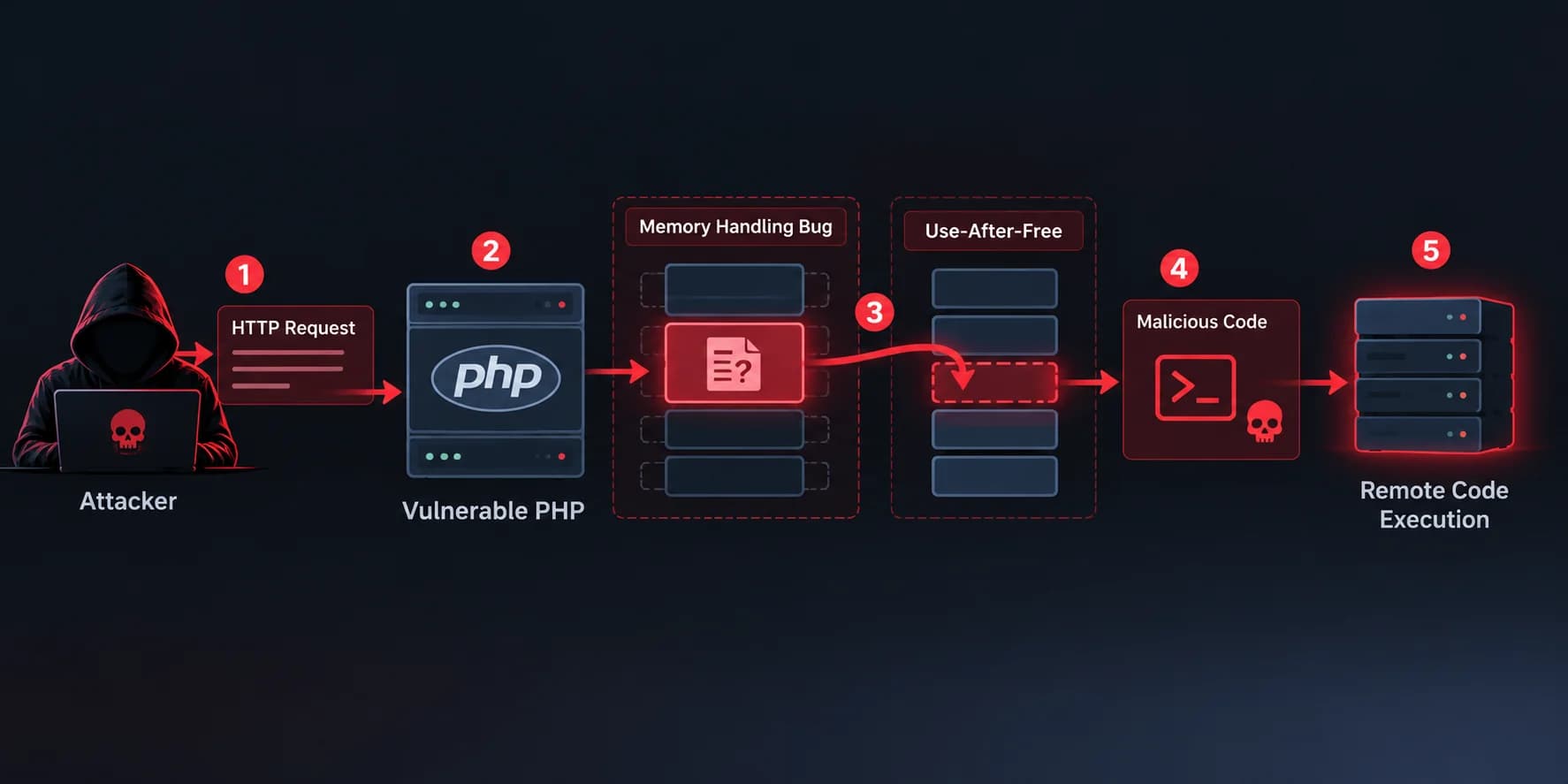
What to take from the diagram: patch and restart the PHP worker. Application-level auth cannot sit in front of several of these paths—especially on mod_php, where a request can fail during startup and still hit vulnerable cleanup before your code runs.
CVE-2026-109618 — OOM corruption
PHP can abort a request with longjmp() when memory limits are hit. In some contexts, request memory is only partially initialized when that abort happens. Shutdown or cleanup may then operate on invalid state. Attackers can drive memory pressure through multipart and related request shapes (and, in some cases, through application-level allocations). On mod_php, request shutdown can run even when startup failed, which is why that SAPI is called out as highest risk.
The shipped fix changes OOM handling so cleanup no longer consumes that invalid state in the same way. PHP’s advisory is explicit: updating is the only complete mitigation.
CVE-2026-109619 — Stale global state
Internal pointers that should live only for one request can remain after the backing memory is freed (for example after certain fatal-error paths). The next request handled by the same long-lived worker may read or branch on that stale state. Confirmed paths include session upload-progress handling; other variants exist. Temporary mitigations such as disabling session.upload_progress.enabled block some confirmed routes but not all.
Together, these issues explain why researchers and vendors grouped them under one operational nickname even though they are separate CVEs.
How to Check Whether Your Website Is Affected
No public homepage scan can prove you are safe. You need to know which PHP binary your web workers actually run.
- Inventory every PHP runtime that serves HTTP: app servers, containers, PaaS runtimes, control-panel stacks (cPanel, Plesk), vendor appliances, and CI images that also run in production.
- Read the version from the worker environment, not only from a laptop CLI:
- Hosting panel or platform “PHP version” setting
php -vinside the same container or host as PHP-FPM / Apachephpinfo()on a temporary admin-only page (remove it afterward)
- Compare against the fixed versions in the table above. If you are on 8.2.34 or earlier in the 8.2 line (or the equivalent for 8.3–8.5), plan an immediate upgrade.
- After upgrading packages, restart workers. Old FPM children and Apache workers keep the previous binary in memory until they are recycled. Confirm the version again after reload.
- EOL branches (8.1 and older): confirm whether your OS vendor published a backport. If not, treat migration as urgent. Isolation from the public internet is the interim recommendation from several national CERTs when patching is not yet possible.
Watch for suspicious activity after disclosure: PHP or Apache processes launching shells or download tools, unexpected files under the web root, new scheduled tasks, and unusual outbound connections from web workers. CISA specifically calls out monitoring for PHP workers launching shells or download utilities.
How to Fix and Mitigate PHP2Shell
Primary fix: upgrade PHP
- Upgrade to 8.5.12, 8.4.27, 8.3.36, or 8.2.35 (or a later point release that includes the same security fixes).
- Prefer distribution or cloud-provider packages when they are already patched.
- Rebuild or redeploy containers so the image layers include the fixed runtime.
- Restart or replace every web-serving worker and re-check
php -v. - On EOL PHP, migrate to a supported branch or apply a verified vendor/source backport, then restart workers.
Source downloads and Windows builds are linked from the PHP downloads page via the advisory on php.net.
Temporary measures (incomplete)
If you cannot upgrade in the next hours, the PHP project documents measures that reduce exposure to specific paths but do not make an installation safe. Highlights include:
- Enforce
memory_limit=-1in a way applications cannot override (for examplephp_admin_valuein FPM or Apache), and ensure nothing restores a finite limit. This removes a controllable OOM trigger for CVE-2026-109618 but does not cover every allocation-failure path. - Keep
post_max_sizeconservative (PHP suggests8Mwhen uploads are not needed,32Mwhen they are) and keepupload_max_filesizebelow it. Bound decoded request size, field counts, and multipart complexity at the reverse proxy where you can. - Set
session.upload_progress.enabled=0inphp.ini/ pool / server config that applies before request parsing, then restart every worker. Do not rely onini_set()or.user.inifor this. - On PHP 8.5,
fatal_error_backtraces=0blocks one confirmed path for CVE-2026-109619 only. - Do not substitute
RLIMIT_ASorRLIMIT_DATAfor PHP’s memory limit; those can push you into the vulnerable allocation-failure path.
National guidance (CISA, NCSC, CERT-EU, and others) additionally recommends isolating internet-facing PHP apps when a patch cannot be applied yet.
Prioritized remediation checklist
- Inventory internet-facing PHP first; patch those immediately.
- Upgrade to a fixed supported release (or vendor backport).
- Restart all PHP web workers; verify version in the running process.
- Apply temporary config hardening only as a bridge—not as a closed ticket.
- Review logs and hosts for post-disclosure compromise indicators.
- Schedule migration off any EOL PHP still in production.
- Keep edge filtering and rate limits in place as defense in depth.
How SafeYourWeb Can Help
A web application firewall sits in front of your origin and inspects HTTP traffic. For PHP2Shell, that matters because several attack paths involve crafted requests (including large or complex multipart bodies) that never need a valid application session.
SafeYourWeb’s proxy-based WAF can help as an additional layer while you patch:
- Filter malicious and anomalous HTTP requests before they reach PHP
- Apply rate limiting and bot controls that slow automated probing
- Improve visibility into blocked traffic and unusual request patterns
CISA notes that a WAF may provide some protection until systems are updated. That is consistent with how virtual patching works for many CVEs—and it is also consistent with PHP’s own warning: only the runtime update fully closes these bugs.
Traditional network firewalls alone do not see enough of the HTTP payload to solve this class of problem; see why traditional firewalls fail against modern web attacks.
Next step: put SafeYourWeb in front of your site for edge filtering and traffic control while you finish the PHP upgrade—explore SafeYourWeb WAF—then verify every origin worker is on a fixed release.
FAQ
Which PHP versions fix PHP2Shell?
Upgrade to PHP 8.5.12, 8.4.27, 8.3.36, or 8.2.35 (or newer builds that include those security fixes). Confirm with the php.net advisory.
Is authentication required to exploit these CVEs?
No. The confirmed impact is unauthenticated remote code execution under the conditions described by the PHP project and the GitHub security advisories.
Are WordPress, Drupal, Joomla, or Laravel specifically vulnerable?
They are exposed when they run on a vulnerable PHP web runtime. There is no separate “WordPress-only” root cause here; patch or backport PHP (and restart workers) for every stack that embeds it.
Is a configuration change enough?
No. Official mitigations may reduce specific attack paths. PHP states that updating to a release that contains the patch is the only complete remediation.
How do I know the patch is actually running?
Check the version in the same environment as your FPM pool or Apache module, then restart workers and check again. Package installs that leave old children running are a common false sense of safety.
Should I rely on a WAF instead of upgrading?
No. Use a WAF as defense in depth and for virtual patching while you upgrade. Do not close the incident until the fixed PHP runtime is verified in production.
Sources and last reviewed
Last reviewed: 23 October 2026
Primary and national sources used for this article:
- PHP.net — Security advisory: Critical remote code execution vulnerabilities, update now (21 Oct 2026)
- GitHub Advisory GHSA-w8hw-w9fx-j79w (CVE-2026-109618)
- GitHub Advisory GHSA-6wmf-4rv5-p3rp (CVE-2026-109619)
- The PHP Foundation — Today’s PHP Security Release
- CISA — Critical Vulnerabilities in PHP Require Immediate Patching
- NCSC (UK) — Critical security issue affecting PHP
- CERT-EU Security Advisory 2026-018
- Canadian Centre for Cyber Security AL26-026
Supporting context: The Hacker News early coverage (pre/at-release reporting; technical details superseded by php.net and the GHSA records).
Conclusion
PHP2Shell is a serious, verified pair of unauthenticated PHP remote code execution vulnerabilities. The correct response is operational, not rhetorical: inventory PHP, upgrade to a fixed release, restart every web worker, and verify the running version.
Use configuration hardening and edge controls—including SafeYourWeb—to reduce exposure during the upgrade window. Do not treat those layers as a substitute for the official security fix. Patch first, then keep monitoring for exploitation attempts as public research and tooling continue to evolve.